Desertcart purchases this item on your behalf and handles shipping, customs, and support to Chile.
🎧 Elevate your audio game—connect, play, and belong like never before!
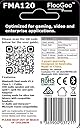
The FLOOGOO FMA120 LE Audio Bluetooth Adapter is a cutting-edge USB-A dongle designed for professionals and gamers seeking ultra-low latency, lossless audio streaming, and broad device compatibility. Supporting advanced codecs like aptX Lossless and LE Audio, it enables high-quality 2-way audio with mic support, Auracast broadcasting/receiving/relay, and hearing aid compatibility. Backed by exceptional manufacturer support and firmware updates, it’s the ultimate gateway to seamless multi-device Bluetooth audio connectivity.


| ASIN | B0CN71FL92 |
| Additional Features | GMAP Gaming: High-Quality, Low-Latency 2-Way Audio with Mic for Sony WH-1000XM6 & PS5, aptX Lossless, Lossless LE Audio & aptX Lite Low-Latency Gaming |
| Audio Input | USB-A |
| Audio Output Mode | a2dp |
| Audio Output Type | Bluetooth, Auracast |
| Best Sellers Rank | #49 in Bluetooth Network Adapters |
| Brand | FLOOGOO |
| Color | white |
| Compatibility Options | smartphone, laptop, tablet, TV, gaming console, speaker, headphones, earbuds |
| Compatible Devices | Laptop, Speaker, Television |
| Connectivity Technology | USB |
| Connector Type Used on Cable | USB Type A |
| Customer Reviews | 4.0 out of 5 stars 159 Reviews |
| Hardware Interface | Bluetooth |
| Installation Type | wired |
| Item Weight | 5 g |
| Manufacturer | Flairmesh Technologies |
| Model Name | FMA120 |
| Number of Channels | 2 |
| Number of Ports | 1 |
| Special Feature | GMAP Gaming: High-Quality, Low-Latency 2-Way Audio with Mic for Sony WH-1000XM6 & PS5, aptX Lossless, Lossless LE Audio & aptX Lite Low-Latency Gaming Special Feature GMAP Gaming: High-Quality, Low-Latency 2-Way Audio with Mic for Sony WH-1000XM6 & PS5, aptX Lossless, Lossless LE Audio & aptX Lite Low-Latency Gaming See more |
| Supported Application | Music, Voice, Spotify, YouTube, MP3, AAC |
| Supported Media Type | bluetooth |
| Supported Standards | Bluetooth 5.4, aptX, aptX HD, aptX Adaptive, aptX Lossless, LE Audio |
| Unit Count | 1 Count |
| Wireless Communication Standard | Bluetooth |
| Wireless Compability | Bluetooth |
G**H
Perfect for the Sony INZONE Buds (and other LE Audio headsets) plus excellent customer support
I bought the Sony INZONE Buds in 2023 and initially I was only plannung to use them for the PS5, knowing that compatibility will be limited. The peculiar feature of these is that they don't use any classic bluetooth connection or codec (like adptX), only LE Audio (also know als LC3 codec). The only method of connection was the bundled dongle, a rather flimsy piece of equipment and very soon I felt it a bit tiresome to always unplug it from one device and plug it into another; was almost a bit regretful over not having bought inears with broader compatibility. Nonetheless, since the headset was pretty great (good sound and very long lasting battery) I kept it while being on the lookout for a way to connect it to pc and smartphone another way. Smartphone compatibility simply rose over time, but on the pc front I went through several dongles without success. Among them the eppfun AK3040 PRO MAX, which claims to be LE Audio compatible as well as the Creative BT-W6 for which even the Creative support gave misleading feedback before the purchase, only to admit it isn't compatible after I returned the device. -.- I was about to give up when I stumbled over an Australian company, Flairmesh, producing a bluetooth LE Audio dongle, the FlooGoo FM120. Since I needed to import the dongle to Germany, again I sent a question to the customer support: "Is it compatible with the Sony INZONE Buds?" Their answer really suprised me: "No", but they promised me to buy the Sony INZONE Buds, test them and publish a compatible firmware. And...well...they did, a few weeks later. Nothing more to it other than to acknowledge and praise what is EXCELLENT customer support, dare I say a rare thing these days. I imported the dongle, and it works. If I had to dig up any kind of critique for the FM120, it'd be that the process of pairing bluetooth devices is a bit finicky. Because there is a button on their software that reads "add device" and I was expecting it to show me a list of devices to pair, as when you use a regular bluetooth dongle in Windows or when adding devices with a mobile phone. Instead it will automatically search for and pair with devices that are in close proximity to the dongle. The software is not needed for (subsequent) pairing, or at all. You just plug the dongle it, use the inears and it works. But with the software you can change modes and codecs according to your needs, be it high quality lossless audio or low latency for gaming. Especially the latter is very impressive because it really is fast, making for no perceivable audio delay for the inears I tested. There is a limitation in the hardware or software, as in that an LE Audio device will always take precedence over any classic bluetooth device. This is a limitation by the current available chipset for LE Audio and other dongles (who weren't compatible in the first place though) have these notes plastered on their description pages as well. I tested several classic bluetooth headsets / inears (before I settled to only use the Sony INZONE Buds, as they are the best I have anyway) and when only these you can easily switch between them. All in all I'm very pleased with the whole process of aquiring the FlooGoo FM120 and it finally fullfills the task I've been looking for, for almost two years. :)
R**B
AMAZING - So good that I did not appreciate it at first!
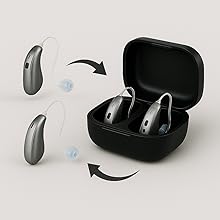
I have tried many USB audio adapters and this is the ONLY ONE that works as it should. It is reliable, versatile and extremely useful. I use it with my Phonak hearing aids, for both computer and iPhone connectivity. Most importantly, is the unmatched follow up and concern of their tech support. The seller IS the manufacturer, and his concern for his customers is incredible. At first I did not appreciate this Bluetooth adapter and actually returned it. Without my reaching out, the seller contacted me, to inquire what was it that I did not like. This led to a numerous back and forth messages, and my vastly improved understanding of the product's potential. Over nine months I realized the limitations of other USB adapters and kept hearing glowing things form associates about this, the FMA120. UNLIKE OTHER USB dongles, that I dumped, returned or gave away, due to unhelpful, and uncaring technical support or product claims that did not work, THIS seller took such an interest in understanding my use case scenario, and even crafted a firmware version for people with similar needs. Eventually, I decided the only thing I could do was PURCHASE THIS AGAIN. Repeatedly I would reach out with a lame or befuddled question, always due to my impatience, or confusion, and every time within hours, (time-zone considered), I would get a concerned and helpful response. Bluetooth can be confusing due to the various similarly named protocols, and the varying needs of one way and bi-directional sound transmission when hearing aids are involved. Most hearing aid manufacturers are either late or lax in modernizing their Bluetooth specifications and especially lame in regards to Auracast. Auracast is an emerging technology that for many devices has not yet been fully implemented. but which IS THE FUTURE of audio streaming to audiences at religious, performance and public gatherings. And which can today be used at home, work and in more and more ways. Hearing aid users will find a knowledgeable, concerned and helpful vendor here. The FMA120 can be used from TV to multiple family earbuds/headphones. You will enjoy this - ahead of it's time product, made by an outstandingly dedicated manufacturer. I am writing this unsolicited review, not as an ad, but as an acknowledgement of something special in both product and service from this company. This item, along with the company's other similar product the FMA121 is a reliable gateway into a whole world of connectivity - YOUR WORLD!
P**E
Great buy used but still works like new except the box
I bought it for my wh-mx6 Sony headphones. Cause I wanted low latency for gaming wirelessly on my bed rather than my other headphones that are wired. Installation was very simple for me just plug and play it automatically connected when paired with my headphones. Changed to gaming you can tell the quality difference between high quality and gaming but if I always keep them on gaming I would probably not notice difference. But switching between the two you can tell. One problem I didn’t know was that if you have both mic and headphones on at the same time the quality of the sound is diminished significantly. So it is best to have an optional mic on hand then the sound quality is back to normal. Firmware update is simple either pick the G bin or non g bin and install firmware. Def notice the low latency for gaming as it is said on the product and my headphones.
W**N
Not great for IEMs and Gamers
Great Potential, but Frustrating LE Audio Stream Lockups Require Manual Firmware Upgrades While the audio quality and low latency are impressive when it works, this dongle suffers from extremely frustrating connectivity bugs out of the box if you plan to use LE Audio (LC3 codec). Whenever audio is paused for more than 10 minutes or if you walk slightly out of range (like stepping into an adjacent room), the audio stream completely freezes upon returning. The dongle stays connected according to Windows, but playback remains totally silent. The only way to force the audio back on is to manually open Windows Sound Settings to trigger an audio endpoint refresh, or power cycle the headset—which completely ruins the point of a seamless wireless setup. Resolving this required diving into global USB power settings, hunting down standalone firmware update files directly from the manufacturer's website (since the software doesn't automatically fetch updates), manually flashing to firmware 1.1.7.3, and dealing with a painfully finicky re-pairing process that took nearly fifteen minutes to rediscover the headset. For a product at this price point, LE Audio stream recovery should work out of the box without requiring deep technical troubleshooting, driver tweaks, and manual firmware flashing just to keep the connection alive after taking a short break.
E**O
Perfect for Linux gaming with WH-1000XM6
Low latency gaming mode was super easy to setup with Sony WH-1000XM6 firmware 3.1.5, after updating the adapter's firmware too. Having an open-source configuration app that also works on Linux with full functionality is a huge plus. Just wish I could update the firmware from Linux instead of Windows... As an engineer, I love all the technical documentation and attention to detail. Definitely money well spent to support them.
A**S
Will not work with embedded A2DP drivers from Windows 11!
If you have a supported GMAP profile headphone/headset, this is the way to go. Yes, it's USB-A, but you still have those post in your PC, right? This is the go-to for supported devices. You don't have to worry about embedded A2DP drivers with Windows 11 (at least, from my experience). That being said, if you have a pair of Sony WH-1000XM6s and you're looking for head tracking, this won't work in conjunction to that. GMAP profile for low-latency, or head tracking with embedded A2DP drivers, not both! That's a trade I'm willing to take!
A**W
Enables Low Latency LC3 Codec on Sony WH-1000XM6
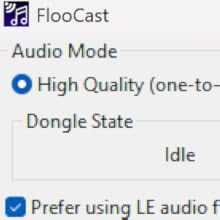
This dongle works well with the Sony WH-1000XM6 and can send audio in the LC3 Low Latency codec to the XM6. A latency test I performed shows about 20ms latency, which is what I expected given the reporting on these headphones and LC3. The biggest issue is that the audio output to my XM6 is very "loud". That is, I have to set my volume on Windows to a low setting. 12/100 is almost too loud. 5/100 is about fine for general listening. Not sure if this is how the FMA120 is or if it's a Windows 10 thing, but additional volume controls would be appreciated as the XM6 do not have internal volume control. Regardless, this is mostly an annoyance, and not a dealbreaker. It's important that you follow the instructions from FlooGoo, including using the Sony headphones app to set the XM6 to prefer Low Latency codecs and set the FlooCast software to "Prefer using LE audio". The setup could be simpler, but once you've got it setup it should work fine. Multipoint works as well, my XM6 can connect to the FMA120 and my iPhone at the same time. The switchover in playback works just as it did with my PC's built-in Intel Bluetooth chip. One thing I'd change is the FMA120 and the FlooCast software supporting a typical pairing flow, where you search for devices and then select one to pair to. As it stands, when in pairing mode, the FMA120 searches for a device in pairing mode and pairs automatically. This was finicky. I got it to work eventually, but I was worried it might try to pair to the wrong device as I live in an apartment building and sometimes neighbors' smart TVs or similar are left in pairing mode. The software could also be polished, *however* I like its simplicity in showing you pretty much all the options upfront, basically no hidden menus or features. I didn't test the Auracast features.
R**.
Technically a good product - but didn't achieve my goals
I am a new hearing aid user and ordered this dongle to stream high-quality audio from my Windows 11 laptop. I am a former musician and I normally listen to HD and UHD music files from my phone with high-end earbuds that are LDAC capable (lossless audio) or some good, wired headphones on my laptop. My laptop is a late-model unit with Bluetooth LE and LE Audio and I can pair my hearing aids directly with the PC. I was hoping to get better audio quality with the FMA 120 (a hearing aid fitter I follow on YouTube thinks the dongle is all that and a bag of chips), but the audio is no better that what I get with direct pairing (without the dongle). Coupled with the fact that the hearing aids disconnect from my phone when connected to the dongle (or the PC for that matter), I have decided it's just not worth it. I will continue to use some good quality on-the-ear lightweight wired headphones over my hearing aids when listening to media on my PC. I think it's only fair to say that the audio quality is probably largely a function of the hearing aids. I have great, high-tech hearing aids but no hearing aid has drivers capable of producing the low frequencies that music lovers like to hear (the bass) in music.
A**E
Schweizer-Taschenmesser unter den Bluetooth-Dongles
Nach ein paar Realtek-basierten Bluetooth-Antennen (Windows Bluetooth-Stack) und dem Sennheiser BTD 700 Dongle (Knack-Geräusche seit Firmware 3.11.0, Probleme mit aptX Lossless, bzw. Wechsel zu aptX Adaptive) habe ich den FlooGoo FMA120 für mich entdeckt. In Verbindung mit der FlooCast-App ist der Dongle eher ein Schweizer-Taschenmesser als ein gewöhnlicher Dongle. Ich nutze den Dongle mit einem Bose QuietComfort Ultra (Gen 1) Headset. Über die App kann ich sauber zwischen allen Codecs wechseln und das Headset macht die Wechsel (insbesondere im Vergleich zum BTD 700) problemlos mit. Die blinkende LED lässt sich per App abschalten, sehr gut. Firmware-Update (und da gab es schon diverse Upgrades) ist auch schnell eingespielt und die App lässt sich nach dem Autostart automatisch in die Systray minimieren. Zur Sprachqualität in Teams Meetings kann ich zwar noch nichts sagen, aber bisher bin ich sehr glücklich mit dem Dongle. Es lohnt sich also, ein paar Wochen (kommt aus den USA) auf das Teil zu warten.
フ**ゴ
無線イヤホンを使いたいPCゲーマーにオススメできる一品
WindowsPCにて、LE Audio (LC3コーデック) で EarFan Air Pro 4+ を接続して半月ほど利用しています。 実用面で全く問題なく、接続安定性や音質面で不満を感じることはありません。 遅延も少なく、ナイトレイン等のアクションゲームをプレイしていても音ズレの違和感を感じることはありませんでした。 私の感覚では、競技FPS級のPvPゲームで数フレームの遅れが命取りになるレベルの状況でもない限りはゲーム用途として何の問題もなく実用できる低遅延っぷりと思います。 噂によると、環境によっては有線接続よりも遅延が少なくなるケースもあるとか…? 余談ですが、EarFan Air 4 Pro+ をFMA120へ初回接続するときは、まずスマホのEarFanアプリにイヤホンを接続し、アプリからデュアル接続の設定を開いてFMA120へ接続するとスムーズに接続できました。
J**E
Idéal pour aides auditives
Fonctionne parfaitement, la connexion avec mes aides auditives Signia à été aisée (avec l'aide d'internet). Très satisfait
J**H
LE Audio
This device works amazing, I use the Sony XM5 ear buds and XM6 headphones with LE Audio. It takes a bit to setup and to update the firmware but once its all set it works perfectly, you can set it and forget it. The only minor issue is you can only add one device at a time for LE Audio mode, so if you have more than one pair of ear buds or head phones you need to pair them again if you want to use another device. High Quality mode this isnt an issue as you can add multiple devices, it must be something to do with LE Audio mode.
W**Z
Just works
Needed a decent way to listen to my headphones and wireless iems without the latency the other bluetooth dongles caused. This really just worked so easily and connected seamlessly. Theres almost no latency. I have no issues at all.
Trustpilot
1 week ago
3 weeks ago