🖨️ Print smarter, faster, greener — the pro’s choice for sleek productivity
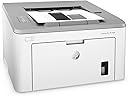
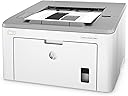
The HP LaserJet Pro M118dw is a compact, monochrome laser printer designed for professionals and small teams. It delivers sharp 1200 dpi prints at speeds up to 30 pages per minute, with a large 250-sheet input tray and automatic duplex printing to save time and paper. Featuring versatile connectivity options including wireless, Ethernet, Wi-Fi Direct, and voice commands via Alexa, it supports mobile and cloud printing effortlessly. Energy-efficient with HP Auto-On/Auto-Off technology and equipped with a long-life imaging drum, it’s built for reliable, high-quality output up to 2,000 pages per month.


| ASIN | B07HB6NPP4 |
| Additional Printer Functions | All In One, Copy, Scan |
| B&W Pages per Minute | 30 pages_per_minute |
| Best Sellers Rank | #229,601 in Office Products ( See Top 100 in Office Products ) #279 in Laser Computer Printers |
| Brand | HP |
| Built-In Media | 4PA39A HP LaserJet Pro M118dw Printer, Getting Started Guide, HP LaserJet Black introductory toner cartridge (~1,000 pages), HP Original LaserJet Imaging Drum (~23,000 pages), Power Cord, Printer documentation., USB Cable |
| Color | White |
| Color Pages per Minute | 1 |
| Compatible Cartridge | HP 94A, HP 94X |
| Compatible Devices | Laptops, PC, Smartphones |
| Connectivity Technology | Ethernet, USB, Wi-Fi |
| Control Method | Voice |
| Controller Type | Amazon Alexa |
| Customer Reviews | 4.4 out of 5 stars 2,533 Reviews |
| Display Type | LED |
| Duplex | Automatic |
| Global Trade Identification Number | 00192545923477 |
| Hardware Interface | USB 2.0 |
| Ink Color | black |
| Item Dimensions D x W x H | 14.6"D x 16"W x 8.8"H |
| Item Type Name | Laser Printer |
| Item Weight | 15 pounds |
| Manufacturer | HP |
| Maximum Copies Per Run | 2000 |
| Maximum Copy Resolution Black and White | 1200 dpi |
| Maximum Copy Resolution Color | 1200 x 1200 dpi |
| Maximum Copy Speed Black and White | 30 pages_per_minute |
| Maximum Media Size | 8.5 x 14 inch |
| Maximum Print Resolution Black and White | 1200 dpi |
| Maximum Sheet Capacity | 250 |
| Model Name | 4PA39A#BGJ |
| Model Number | 4PA39A#BGJ |
| Model Series | 4PA39A |
| Number of Ethernet Ports | 1 |
| Number of Trays | 1 |
| Other Special Features of the Product | Auto-Duplex, Cloud print enabled, Compact design, Energy Star, Ethernet networking, HP auto-on/auto-off technology, LED control panel, Network-Ready, Optional HP high-yield cartridges |
| Output sheet capacity | 250 |
| Paper Size | 3 x 5 to 8.5 x 14, Letter, Legal, Envelope |
| Print media | Card stock, Envelopes, Glossy photo paper, Labels, Paper (plain) |
| Printer Connectivity Type | Ethernet, USB, Wi-Fi |
| Printer Output Type | Monochrome |
| Printer Type | Laser |
| Printing Technology | Laser |
| Processor Count | 1 |
| Resolution | 1200 x 1200 |
| Scanner Type | Flatbed |
| Special Feature | Auto-Duplex, Cloud print enabled, Compact design, Energy Star, Ethernet networking, HP auto-on/auto-off technology, LED control panel, Network-Ready, Optional HP high-yield cartridges Special Feature Auto-Duplex, Cloud print enabled, Compact design, Energy Star, Ethernet networking, HP auto-on/auto-off technology, LED control panel, Network-Ready, Optional HP high-yield cartridges See more |
| Specific Uses For Product | Office |
| Total USB 2.0 Ports | 1 |
| Total Usb Ports | 1 |
| UPC | 192545923477 |
| Unit Count | 1 Count |
| Warranty Description | One-year limited warranty |
| Warranty Type | limited warranty |
| Wattage | 480 watts |
C**.
Great B&W printer, fast, user friendly, easy install, no hum.
I wanted a black and white printer only. I didn't need another scanner, just a printer that could do double-sided if I needed it to. It prints fast and clearly - I have had no problems with track marks like some others. Double-sided works great and is easily turned off if you don't need it. The paper tray holds a lot of paper. The toner that came with the printer lasts a long time. It is now telling me toner is low and even though toner is low, I just printed 270 pages no problem with the toner low (one-sided). I have had no experience with any kind of humming noise when it isn't printing - mine is totally silent when not printing. It's about as noisy as any printer when it's printing. It connects wirelessly and through Airprint for Apple which is great. The initial install was the easiest printer install I have ever done - took less than 5 minutes and I was up and running by going to the HP website (I don't have a disk drive to use so had to use the online version). I made sure to buy an extra toner at the time of purchasing this printer and I still haven't needed to use it and I have printed at least 600 pages, so I'm happy with the initial use toner cartridge because other printers have starter ink / cartridges that barely last at all. It's also a very compact size so it fits easily on my printer cart. 10/10 for this printer so far! (I will update if anything changes.)
A**E
Good, Basic Printer
I don't need to print in color, nor do I print in high volume. I just needed a basic monochrome laser printer with WIFI to replace an older office one without WIFI. I waited until now to write a review to spend time using it and see how holds up. As of this writing, it has performed flawlessly. Setup was easy and straightforward. The printer has not dropped its WIFI connection to my network once since I've installed it. Sleep mode is undefeatable, but I've never had a problem with it at all. In fact, this printer wakes from sleep and prints almost instantly. My expectations for the price point weren't very high when I bought this. So far, I'm pleasantly surprised by the function and build quality of this printer. I think it's a good buy for the money.
R**Y
Great Printer for the Price
This printer is only a tad over $100, yet it offers nearly 30ppm and duplexes. It also has built-in wireless AND hard-wired Ethernet, not to mention USB 2. It fires up fast, is quiet, and actually looks pretty nice, too. I've bought a ton of HP printers over the years. Fifteen years ago, a printer with these specs (actually, it wouldn't even have all these specs) was about $1,500. Print quality is good. I have it in my office and I'm very happy with it. Print cartridges are always going to be expensive, but this is one area where I recommend that people buy the brand. I've just had too many problems with off-brands: squeaking, inconsistent printing, smear marks, and on and on. It just isn't worth it. You're better off just buying the brand model, and then exercise a little care in what you print. Don't just rush to print every little thing: hold back a bit. You can "buy back" some of that brand cost with this approach. But as for this printer, this is an EASY, and I mean REALLY easy, Five Star item.
S**R
The most useless installation instructions I've ever experienced
If you want to install this as a wireless printer, throw away the instructions. The proper way, and maybe the only possible way, is to put the printer near a router. Connect the power cable. Press the power button to power on the printer. Get an ethernet cable and plug it into the router and printer. If you know how to find the IP address of the printer, browse to the IP address, and set up the wifi connection. An easy way to find the IP address of the printer is to install the "HP Smart" app on Android or iOS. It will find the printer and display the IP address. The app doesn't do anything else. Browse to the IP address and set up the wifi connection. Once the router SSID and password are set up on the printer, you can unplug the ethernet. Once the wireless icon becomes steadily lit, you are connected to the network. Any computer can find the printer, including Chromebooks. Following the instructions on the different OS to complete any installation. Chromebooks support this printer directly, not only the about to become obsolete cloud print. All you need to do is to enter the brand and model to complete the installation. I cringe always at the instructions of the unpronounceable electronics brands. The HP instructions that come with the printer rise to the next few levels. The HP Smart app is a decoy to confuse the hell out of you. It doesn't install anything or does anything. You can't see anything if your printer isn't connected to your network already. There is a wifi access point at the printer. You can set up your phone or computer to connect to the printer SSID. But you can't do anything except for going offline, print, and then go back online. Who the hell needs that? But then it probably isn't enabled by default. To enable it you need to connect the printer to your network first, but then after that, you don't need to enable it anymore. A lot of dubious apps will make use of the access point, ask for your wifi router password, and then finish the wireless setup. But HP won't go that low because that's a security risk. It's purely a time-waster. If you have Windows or Mac, you can just plug it into the USB and maybe do the setup there. But then you don't need a wireless printer. You can download software to complete installing the printer but by the time you have found the website and completed the download, you could have completed everything my way. It's plug and play if you plug the printer into a Chromebook, but you have to carry the printer with the Chromebook. That's mobile printing for HP. You can't set up the printer via the Chromebook. For this model without and UI and screen, you cannot connect to your wifi with a standalone printer. You can print out the status of the printer but not using the "i" button as instructed. It's the button with a page of words. I was so desperate when I tried the WPS button on my router the 1st time in my life to try to connect the printer. It doesn't work. So that's why I never use the WPS feature. The language of the manual is perfect. The paper and print quality is perfect. The icons and pictures are clear and nice. Everything else is useless.
A**R
it works on wireless finally no problems
I bought this printer because HP applied an update to its old printer to use the older security protocol, so the old printers started having wireless problems disconnecting from your connection. So if you have an older HP you know what I'm talking about and probably gave up on the wireless connection, unless you change your router setting to use TKIP and still it might work or not. the good news on this printer that it is using a different protocol and connecting to the wireless router and printing with no issues so far. The fonts are crisp clear, fast, and easy install this time. The only downfall that is it bigger than the 102W or 1102W and that type of laser jet but its not heavy at all. overall dont hesitate to replace your old HP for this one if you are facing what i faced with the wireless connections i mentioned.
M**C
Very Crisp Pictures at a very reasonable price
If you are looking for a Black & White Laser printer this HP is quite good. It is not color capable and will not scan documents just so you know. I have another printer for that, so in this case, I was looking for high quality B & W at a reasonable price. The printer has both wired and wireless capability. I have it hooked-up into my home network and that allows anyone at home to select it and print. I appreciate the dual sided capability and have calculated that using off-brand cartridges with discounted paper, I am paying just over 3 cents for a dual sided copy (not counting the printer fixed cost investment). The print quality is far superior to an ink jet. Small foot print, quiet, and very easy to set-up and use. I am very satisfied and highly recommend. Marc - SC
A**R
Terrible Printer
I have had this printer for 2 years and it’s been problematic since the beginning. It has now completely died and is not worth fixing. To start off, it’s very flimsy. I have had several HP printers and this one is junk. It’s the worst printer I’ve ever had. It is very difficult to install the driver. I got this working on 2 iPhones and 1 Mac but could not get it to work on my laptop no matter what I tried. The double sided printing comes out crooked, the printer constantly jams, it doesn’t always grab from the paper tray and the wireless interface is clunky. I often have to unplug it several times in order for my phone to find it. And then it stops working after a few pages and I have to go through it all over again. This printer is utter junk and I’m kinda glad it has died so I have an excuse to buy something else. I absolutely do not recommend this printer.
J**N
I have no idea why some people are unhappy with this printer.
I recently moved to one of the "cities" in Idaho. (There are about 50,000 people in this town.) Prior to moving I had DSL and my Samsung wireless printer worked fine on my local network. I have fiber optic in my new house and the Samsung M2020 could not see the new network. Fair enough, the Samsung is about five years old. I read many reviews about networkable, home laser printers and decided on this HP model for three main reasons: 1. There is an Ethernet port so I can simply plug the printer into the router and avoid dealing with Wi-Fi. 2. This printer comes with a plethora of features such as automatic dual side printing as opposed to mono side printing and then having to feed the paper in again in order to print on the back. 3. The amazing low price. This printer sell for just under $100 - with my Amazon points I paid $55.00. I had read that some customers were unhappy due to the difficulty they experienced setting up each of their computers to print to this printer. All I can say is that setup and configuration on each machine I own took about five minutes per machine. In all honesty it took me more time to remove the packing tape from the printer that actually setting up the printer. Step 1:Remove all the tape Step 2: Plug the printer into the wall. Step 3: Connect the printer to the router via and Ethernet cable. Step 4: On each Windows machine you have, search for new printer under the add printers screen Step 5: Select the new HP printer from the list. Step 6: Click the setup button that appears on the screen. Step 7: Print On my Linux laptop the new printer was found and configured automatically so I was able to skip ahead to step 7. Really folks, it was that simple. Another complaint that I read about was that this printer uses "special toner", that is toner that is different from all other (less expensive) toner. As I am still on the toner that came pre-installed, I guess I don't know if it is difficult to buy toner or not. I do know I found a link that takes me to the HP store to buy new toner. I suspect that the customer who was complaining about the "special toner" really meant it is difficult to find 3rd party toner which is compatible with HP's toner cartridge. My only response to that is, when the printer (especially one that comes with all the features this one has AND is incredibly simple to set up, like this one is) costs so little, I guess you can expect to pay a premium on toner - HP is in this game to make a profit after all. All in all, I recommend this printer! I really like the email feature which allows me to email documents from the road and have them waiting for me when I return home.
M**I
.
Very excellent printer and I recommend it It's a great choice
A**E
Very good printer
received item fast ! works great
Trustpilot
2 days ago
1 day ago